
How to start CFD trading? First, open a trading account and choose the platform that matches your experience, goals, and preferred market access.
New traders should begin with a demo account. This allows them to practise placing trades, testing tools, and understanding price movement without risking real money.
During registration, choose your leverage level and account base currency carefully. These choices affect risk, margin, and how your account balance appears.
For more learning, review our technical analysis guide or read this external guide from Investopedia.

After setting up the platform, choose the asset or instrument you want to trade. CFDs can cover currencies, commodities, indices, shares, and other markets.
Before placing an order, review the instrument specifications. Check trading hours, spread, contract size, margin requirements, and possible costs.
This step helps you avoid confusion and makes your trading decision more structured.

Next, decide whether you expect the price to rise or fall. Choose buy if you expect upward movement, and choose sell if you expect downward movement.
Your decision should come from a clear strategy. You may use technical analysis, fundamental analysis, indicators, or a combination of tools.
Therefore, avoid random entries and make sure every trade has a clear reason.
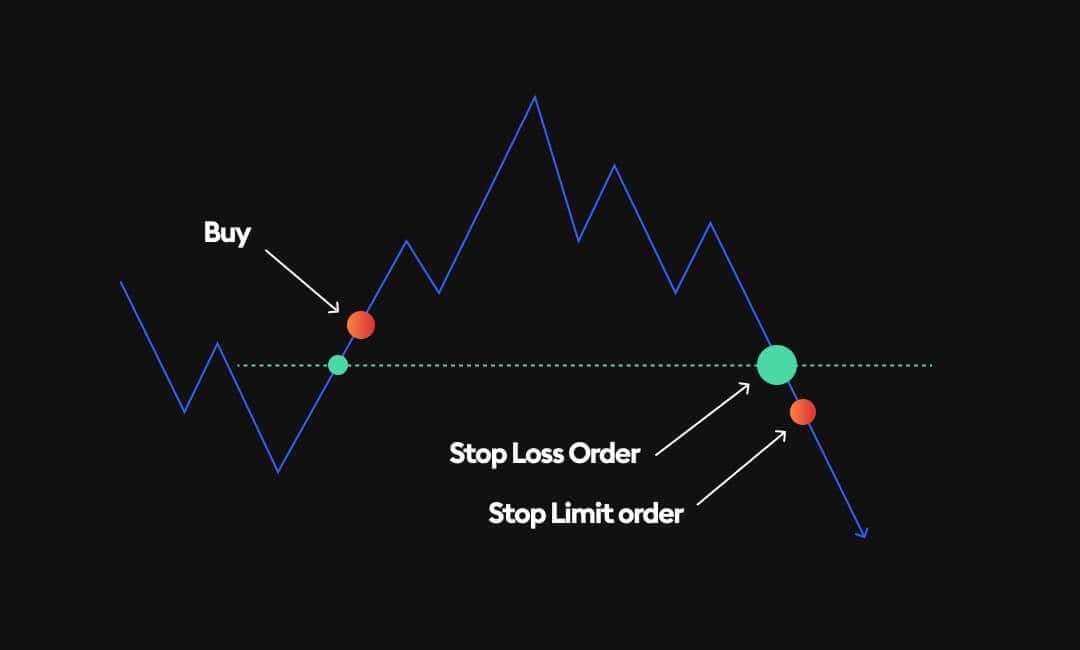
Pending orders allow traders to plan entries before price reaches a selected level. As a result, they do not need to watch the screen all the time.
Buy stop and sell stop orders help traders enter when price continues in a direction. In contrast, buy limit and sell limit orders help traders enter after a possible pullback.
In addition, traders can attach stop loss and take profit levels to manage risk before the order activates.

Trade size controls how much your account can gain or lose from price movement. For that reason, this step is very important.
Choose a size that matches your account balance and risk plan. Larger positions can increase profit potential, but they also increase possible losses.
Traders usually express size in lots or units. This size affects pip value, margin, and overall exposure.

Stop loss and take profit levels help traders manage trades with more discipline. A stop loss limits potential loss, while take profit locks in gains at a planned level.
You can set these levels when opening a trade. You can also add or adjust them later through the platform.
However, stop loss orders use market execution. Therefore, fast market movement may cause execution at a different price.

After opening a position, monitor the trade through desktop, web, or mobile platforms. This helps you follow unrealised profit or loss in real time.
Buy positions react to bid price movement. Meanwhile, sell positions react to ask price movement.
Most importantly, follow your plan and avoid emotional changes during fast market movement.

Closing the position completes the trade. Traders can close manually, or the platform can close the trade through stop loss, take profit, stop out, or contract expiry.
Once the platform closes the trade, the result appears in the account balance. Therefore, profit or loss becomes realised.
A clear exit plan helps traders avoid holding positions for emotional reasons.
Reviewing closed trades helps traders improve. The account history section shows position size, direction, entry price, exit price, profit or loss, and charges.
Each trade receives a unique order number. In addition, traders can generate statements to review account activity.
How to start CFD trading becomes easier when traders follow a structured process: open an account, choose an instrument, plan risk, place the order, monitor the trade, and review the result.